How to Unclog an InSinkErator Garbage Disposal
A practical, safety-first guide to unclogging an InSinkErator garbage disposal, with step-by-step methods, essential tools, warnings, and maintenance tips from Unclog Drain.


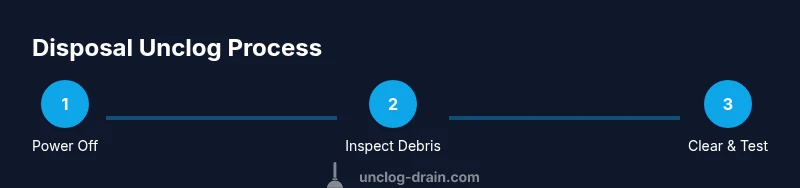
To unclog an InSinkErator garbage disposal, first cut power at the switch or circuit breaker. Use tongs or pliers to remove visible debris, then insert the hex key into the wall access and turn the flywheel to free the jam. Run cold water and power briefly, then reset if needed. Avoid chemical drain cleaners.
What is an InSinkErator and common clog causes
An InSinkErator garbage disposal is a compact food-w Waste grinding unit installed under the sink. It uses a rotating impeller disc to break down food waste, which then exits through the drain. Clogs typically arise from fibrous foods (celery, corn husks), starchy residues, coffee grounds, or grease that adheres to the disposal and P-trap. Over time, a buildup of waste can slow grinding, emit odors, or cause the unit to jam. Recognizing the most common culprits helps you target your fix without unnecessary disassembly. Always remember: a clogged disposal is usually a symptom of material that should have gone to the trash, not processed by the grinder.
Safety first: power, water, and chemical hazards
Safety is non-negotiable when dealing with disposals. Always cut power at the switch and/or circuit breaker before touching the unit. Do not place your hands into the grinding chamber, even when the power is off; use tools only. Water is helpful for flushing debris but never use chemical drain cleaners in or near the disposal. Harsh chemicals can corrode seals, damage plastic components, and create dangerous fumes. Use cold water to solidify fats and help wash them away during grinding. If you’re unsure about electrical safety, consult a licensed professional.
Diagnostic signs and quick checks
Listen for grinding noises indicating a jam, or notice sluggish performance, unusual smells, or leakage around the seal. A red reset button on the bottom can indicate a thermal overload; if it trips, the unit cooled off, you can press the reset after freeing the jam. Use a flashlight to look into the disposal and carefully remove obvious obstructions with long tools. If the unit hums but doesn’t grind, the flywheel is often jammed or bound. These clues guide whether you should attempt a manual release or seek professional help.
Step-by-step methods to unclog
The following methods address the most common jam scenarios and buildup. Start with the simplest approach and progress to more involved fixes if needed. Each method emphasizes safety, avoiding damage to seals and bearings, and ensuring you re-test with fresh water after each attempt. If an approach feels unsafe, stop and call a pro. Remember: never pour chemical cleaners into a live disposal, and always dispose of small objects that shouldn’t be ground.
Aftercare: testing, resetting, and prevention
Once you clear a jam, run cold water through the disposal for 15-30 seconds while grinding to push debris through. Reset the disposal if it has a reset button and then test without food waste for a short cycle. To prevent future clogs, practice mindful waste disposal: avoid fibrous or tough materials, run the unit with regular water, and perform periodic cleanings with ice and a splash of salt to help sharpen the blades. Consider a simple maintenance routine to keep impressively smooth operation.
When to call a professional
If the jam persists after attempting the above steps, or you notice leaks, unusual noises, or electrical concerns, it’s time to consult a licensed plumber or the manufacturer’s support line. Complex clogs deeper in the drain line, damaged seals, or faulty motors require professional assessment. Early professional input can prevent further damage and ensure safe operation.
Tools & Materials
- Safety gloves(Protect hands during debris removal and tool use)
- Flathead screwdriver (optional)(May assist in prying or guiding debris gently if needed)
- Tongs or needle-nose pliers(Reach into the disposal to remove obvious obstructions)
- 1/4 inch hex/Allen wrench(Use in the bottom access hole to manually rotate the flywheel)
- Bucket or drain pan(Catch water and debris when working under the sink)
- Old towels or rags(Contain spills and keep the workspace clean)
- Flashlight(Illuminates the interior and helps spot obstructions)
- Cold water(Use during flushing to help push particles through)
Steps
Estimated time: 20-40 minutes
- 1
Power off and secure the area
Switch off the disposal at the wall and then flip the corresponding circuit breaker to ensure no power reaches the unit. Keep others away from the area during the procedure. This prevents accidental starting during your checks.
Tip: Double-check the unit is dead by trying to turn the impeller with the hex key once power is removed. - 2
Remove obvious debris by hand with tools
Use tongs or pliers to pull out any loose debris visible at the top of the disposal. Do not use your hands to reach into the grinding chamber. Place debris in a bucket for later disposal.
Tip: Work slowly and avoid jamming the tool into the impeller area; you want to dislodge, not force. - 3
Release a jam with the flywheel
Insert the 1/4 inch hex key into the bottom hole and turn the flywheel slowly back and forth to free the jam. When you feel movement, continue turning 5-10 full cycles in both directions.
Tip: If resistance remains, pause and re-check for lodged items in the chamber or at the blades. - 4
Flush with cold water and test
Run cold water through the disposal while attempting to turn it on briefly to confirm free operation. Do not run for extended periods during testing with a jam.
Tip: Keep hands clear and use a steady stream rather than splashing to avoid debris scattering. - 5
Reset and re-test if jam cleared
Press the red reset button if the unit has tripped, then run a short test cycle to ensure normal operation. If the disposal stalls again, repeat the jam-release steps.
Tip: Sometimes a second pass frees stubborn debris; patience prevents damage. - 6
Check for leaks and seals
Inspect the underside and seals for any signs of water seepage. Tighten connections gently if needed, but do not overtighten plastic components.
Tip: A loose connection can mimic a jam by reducing performance; fix it before reusing the unit. - 7
Implement a preventive routine
Queue a small daily use habit and a weekly ice-salt cleaning to sharpen blades and reduce buildup. Avoid fibrous materials and never pour grease down the disposal.
Tip: Regular maintenance reduces future clogs and extends the life of the unit.
Common Questions
Can I use chemical drain cleaners in a disposal?
No. Chemical drain cleaners can damage the disposal seals and pipes, and may cause fumes or reactions with metal components. Mechanical clearing and proper maintenance are safer and more effective for a jam.
Chemicals should not be used in a disposal. Mechanical clearing and maintenance are safer and more effective.
What if the unit won’t reset after a jam is cleared?
If the reset button doesn’t engage, ensure power is entirely cut off and there are no residual jams. If the problem persists, there may be an electrical or motor issue requiring professional service.
If the reset won’t engage after clearing a jam, power off completely and consider professional service if it continues.
Can I use a plunger to fix a clogged disposal?
A plunger can help dislodge clogs at the trap or drain line, but it’s not a direct fix for a jam inside the disposal. Use the plunger on the sink drain while the disposal is disconnected from the immediate jam area.
A plunger may help with the drain line, but it won’t clear jams inside the disposal itself.
How can I prevent future clogs in my disposal?
Run cold water during grinding, avoid fibrous materials, grind small amounts at a time, and perform periodic upkeep with ice and salt to clear buildup. Regular maintenance reduces jams and extends life.
Prevent jams by running water, avoiding fibrous waste, and doing periodic cleanings.
When should I call a professional for a disposal problem?
Call a professional if jams recur after standard clearing, you detect leaks, or there are electrical issues. A pro can diagnose motor or seal damage safely without risking injury or further damage.
If jams keep coming back or you notice leaks or electrical issues, call a pro.
Is it safe to remove a jam with the disposal powered?
No. Never attempt to remove jams with power active. Always disconnect power first, then use tools to clear obstructions. Re-check that the power is off before re-testing.
Always disconnect power before clearing jams; never work with it powered.
What basic maintenance keeps disposals running smoothly?
Regularly run cold water, avoid hard or fibrous waste, and occasional ice-salt cleanings help blades stay sharper and reduce buildup. Check seals for leaks and tighten as needed.
Do regular cooling water runs and avoid tough waste to keep the disposal smooth.
Watch Video
Key Points
- Power off before any work on the disposal
- Use a hex key to manually rotate the flywheel to free jams
- Avoid chemical drain cleaners; opt for mechanical clearing and flushing
- Test with cold water and reset if needed
- Prevent future clogs with mindful waste disposal and regular maintenance